

AE
Continuing Motion After the Last Key Frame
Continue motion after a key frame where there are two key frames. Start a loop at the same spot where your last key frame motion ended when there are three key frames. Similar to the Maya “post infinity” out in the curve editor.
loopOut(“offset”);
Using a Slider Control and Index Expression to Equally Space out Elements
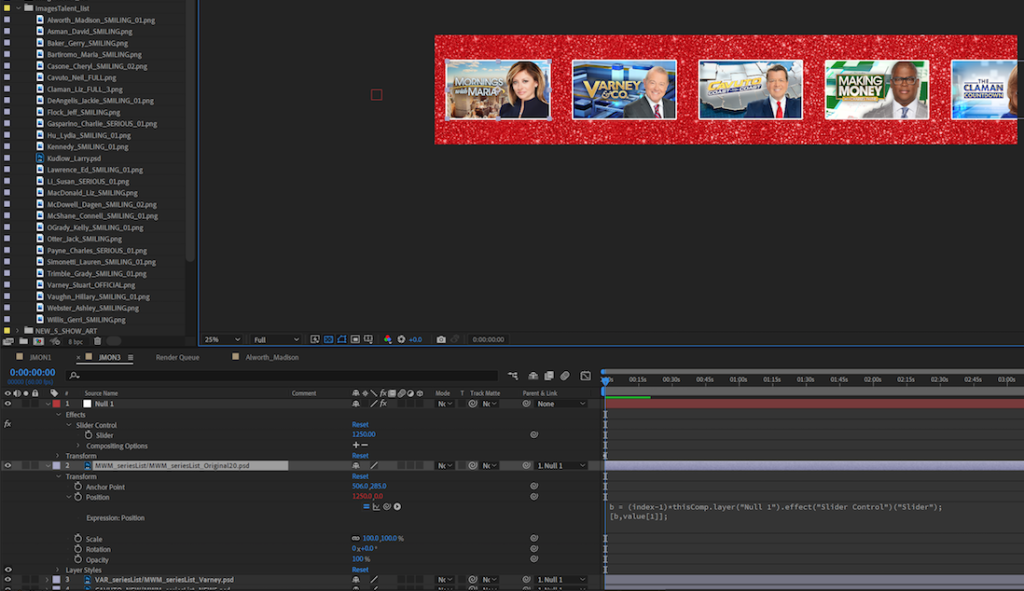
Create a Null Layer and add a Slider Control
This will control the spacing between the elements that follow

Put this expression into the Position expression area:

b = (index-1)*thisComp.layer("Null 1").effect("Slider Control")("Slider");
[b,value[1]];
Expression for a Countdown Clock
Put this expression into the Source Text area of a Text layer (The first number after the bracket controls the amount of seconds, minutes and hours. ie: 4 will show 1:23 but 3 will show 01:23 while using 0 will show 00:01:23)
st = 140;
t = st - time;
c = timeToTimecode(t);
c = c.substring(4,8)